Welcome
From your spreadsheet to the door, in minutes
Holadoor turns your sign-up list into personal QR tickets, and any phone into a scanner. Built for associations, schools, fairs and small venues that want a smooth entrance without the fuss.
Your first event is free and unlimited. No card, nothing to install.
- Your list as it is: Excel, CSV or Google Forms
- Tickets by email, WhatsApp or as printable PDFs
- Scan with any phone, even offline
How it works
Three steps, and your guests are expected
No software to install, no hardware to rent. A web browser is all you need, for organisers and door staff alike.
Import your list
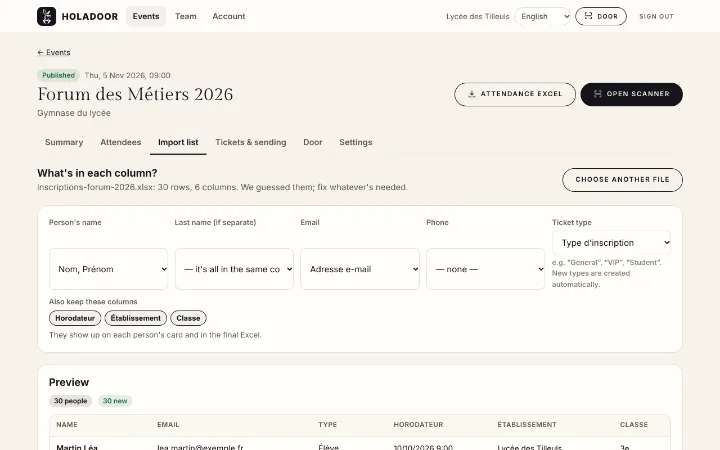
Upload your Excel or CSV file, or paste the link to the Google Sheet that collects your form responses. Holadoor recognises the columns and removes duplicates.
Send the tickets
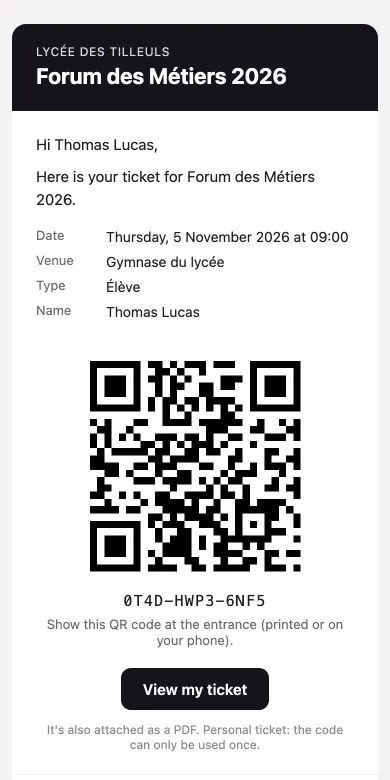
Each person gets an email from your own Gmail with their personal QR code and a PDF ticket. You can also send it by WhatsApp, or print sheets of 8 tickets per A4 page.
Scan at the door
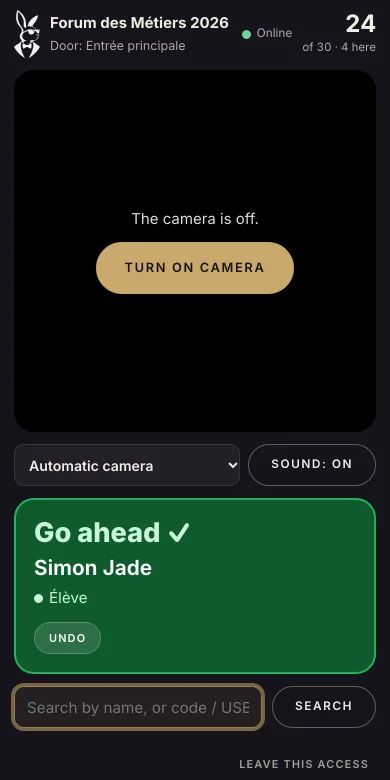
Open the door link on any smartphone and the camera reads the QR codes. Green, go ahead; yellow, already in; red, ticket refused. And if the internet drops, you keep going.
Why Holadoor
Everything you need for a calm entrance, nothing you don’t
Google Forms and Sheets
Paste the link to your responses. After that, one click adds new sign-ups, with no duplicates.
Several phones at the door
One link per phone, no account or app. They all share the same list, so a ticket never gets in twice.
Offline mode
The scanner keeps the list on the phone and goes on validating without signal. Check-ins upload once the connection is back.
Attendance in Excel
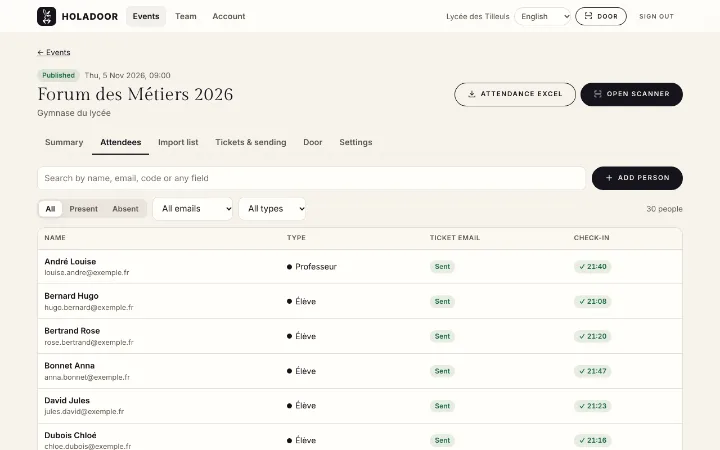
Follow arrivals live, then download an Excel file with who came, who didn’t, and every column from your original file.
5 languages for your guests
Email, ticket and QR page in English, French, Spanish, Portuguese or Italian, chosen per event.
From your own address
Tickets go out from your Gmail or Google Workspace: guests recognise the sender and reply straight to you. Long lists go out in batches.
On the day
A scanner in every pocket
Give each volunteer a link: the scanner opens in the browser, with nothing to install and no password. The counter shows live how many people are in.
- Search by name for guests without their ticket
- Works with USB barcode readers
- A lost link can be revoked in one click
Live
Know who’s there, at any moment
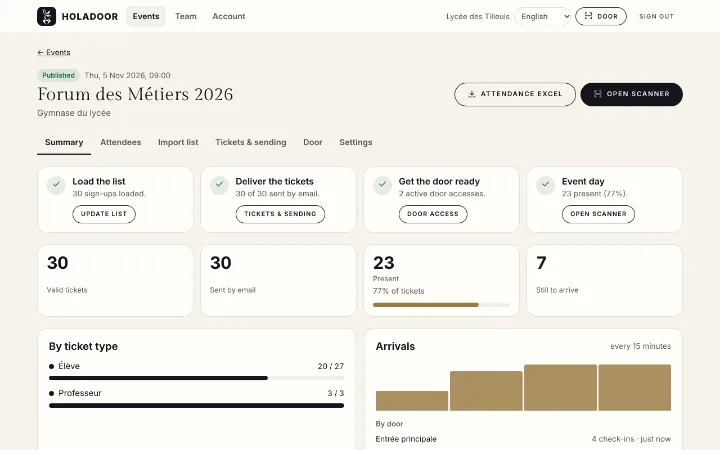
The dashboard shows attendance, arrival rate and a breakdown by ticket type. When it’s over, the Excel file is ready for your report.
- Checked in and still to come, by ticket type
- Arrivals per 15 minutes and per door
- Excel with your file’s columns
Who it’s for
Made for organisers who do it all themselves
Associations & clubs
AGMs, galas, socials and workshops: free tickets, no commission.
Learn more →Schools & fairs
Careers fairs, open days, school shows: welcome hundreds of pupils without queues.
Learn more →Theatres & venues
Performances, festivals, community venues: check your bookings at the door.
Learn more →Companies
Seminars, conferences, staff parties: a polished welcome and the attendance list the same evening.
Learn more →FAQ
What people ask us
Is Holadoor really free?
Yes. Your first event is free with no guest limit. After that, the free plan allows up to 150 guests per event, with every feature and no card. If an event grows, you pay for just that event or move to the Pro plan.
Do my guests need to install an app?
No. They get their QR ticket by email or WhatsApp and show it on their phone or on paper. Your door team simply opens a link in their phone’s browser.
What happens if the internet drops during the event?
The scanner keeps working: it stores the ticket list on the phone and records every check-in. As soon as the connection is back, everything is sent automatically and the counters update.
During the outage, each phone only knows about its own scans: it’s the only time two doors can’t “see” each other.
Can several phones scan at the same time?
Yes. Create one door link per phone, for example one per entrance or per volunteer. They all share the same list: a ticket already scanned at one door shows up in yellow at the other. If a phone goes missing, revoke its link in one click.
Which address are the emails sent from?
From your own Gmail or Google Workspace account, which you connect in one click: Holadoor only asks for permission to send, never to read your emails. Guests see your name and, if they reply, they write to you.
Gmail allows about 450 emails a day (Workspace, about 1,800). If your list is longer, Holadoor sends in batches, day by day, and lets you know when it’s done. You can also send each ticket by WhatsApp or print them.

Your next event deserves a proper welcome
Create your account, import your list and send your first tickets today.
Your first event is free and unlimited. No card, nothing to install.